Many of us have seen the lists circulating on Facebook, asking how many places we’ve visited. One list includes those tourist hot spots that are on EVERYONE’s Bucket List, such as Kabul, Pyongyang, Lagos, and Tehran. Really?
Here’s a list that is far more achievable. You might not be able to claim to have visited all 100, but I’ll bet most can get to about 20 – 25.
Things are slowly starting to open up, despite the Covid variants. We restless souls are once again thinking about traveling. Several of my friends have asked about travel insurance, so I decided to update this post that I originally wrote oh so long ago, in 2019.
Is Trip Insurance worth it? Here’s the Cliffs Note version: It all depends. For some, trip insurance is definitely worth it. But there are caveats. Know what you need, know what you are buying, choose a reputable company, consider other options.
Know What You Need Medicare does not cover you when you are out of the USA, so for some people, the main reason for buying trip insurance is to get medical coverage. We are fortunate enough to have a very generous medicare supplement, which DOES cover us for emergency services wherever we are in the world. So, for that reason, I chose the AIG policy that offered minimal medical and dental coverage, and the medical coverage was secondary. (That means they will pay after other insurance has paid first. So, you need to submit to your primary carrier, and then whatever isn’t covered, you would submit to the secondary carrier.) If your health plan has a high deductible, and high out of pocket maximum, then you may want or need more generous travel insurance benefits.
For some people, “cancel for any reason” protection may make sense. This might be true for someone still in the work force, who may have to change vacation plans because of work responsibilities.
In the past, before Covid, our main concern had been trip cancellation for health reasons (either ours or a family member), or trip interruption. Remember when the volcano in Iceland erupted and people were unable to continue with their original travel plans? That’s the sort of thing that worries me.
You can get plans that offer trip interruption at 100% of the cost of the trip (the amount you are insuring) or 150% of the cost of the trip. Why would you want to purchase coverage for more than the cost of the trip? Well, if your trip is interrupted, you may have to stay in another country longer than planned or you may have to change flight arrangements (which could be very expensive).
What about Covid? Different travel companies have different policies. If a trip has been canceled by the tour company, most are offering the travelers a choice of either a refund or of rebooking with some kind of bonus. It is wise to check the tour company’s policy before submitting your deposit.
But what if you are not on a group tour? What if you are traveling on your own, driving to hotels that allow you to cancel within a day or two of arrival? You may not need any trip insurance at all.
Know What You are Buying I have used Insuremytrip.com to compare various travel insurance options. There are other companies, such as Squaremouth.com, but I’ve had good luck with Insuremytrip, so they are the only company that I have had experience with. Others may be more comfortable using an insurance agent to find the plan that best meets their needs. If you DO decide to do it on your own, be sure to download the complete policy and read it carefully so that you know exactly what you are getting. Things to look out for: Pre-Existing condition exclusion clauses, what qualifies as a covered reason for trip cancellation, what level of coverage is offered for things that are important to YOU and is that coverage primary or secondary? For example, I never check anything valuable when I travel, so I don’t care about the level of coverage for lost luggage. The airlines offer some coverage for delayed or lost luggage, and the airline is usually considered primary. If you are uncomfortable purchasing a plan from the internet, you can speak with a representative for Insuremytrip.com. They are not paid commissions, so they do not have a financial interest in your choice of plan. That may be true of similar companies.
Choose a Reputable Company Take the time to read the reviews. Insuremytrip, for example, includes Better Business Bureau ratings, AM Best ratings, years in business, and reviews by users for each of the companies offered, and allows you to do a side by side comparison of the plans. You can also do a google search.
Other Options Check your credit card for any coverage they might offer. You need to read the booklet that they give you when you first enroll, or compare the benefits of the various companies on line. I had never considered the Chase Sapphire Reserve card, because of its $550 annual fee. Then I read a post from a fellow traveler who explained that Chase reimburses you up to $300 for any travel expenses you incur during the year. They also offer trip interruption and cancellation insurance, up to $10,000 per person and $20,000 per occurrence, with a $40,000 per year maximum. To us, that coverage is easily worth the remaining $250 per year charge. Some of my friends swear by one of the premium American Express cards. It is also possible that Citibank has something competitive, but I have had no experience with either. You may also consider purchasing the insurance that your tour group offers. I always take a look, but so far, have been able to find more attractive options. That may change as we get older. If the thought of doing all that research gives you a massive headache, you can always choose an agent who is knowledgeable about trip insurance and can help you find the coverage that best meets your needs. If you don’t already have an agent, Dan Drennan was highly recommended by a traveler on a travel forum, and rightfully so. I’ve had positive experiences with Dan and am pleased to share his phone number with you: 402-343-3621.
Tips for Filing a Claim Sadly, in 2019, on our trip to Australia, we had the opportunity to investigate in great detail how Trip Interruption Coverage works. We were pleased (and quite frankly, amazed) by the speed with which we were reimbursed for our expenses. Here are some suggestions to help you navigate the claim process, should the need arise.
Notify the insurance company as soon as you realize you will be submitting a claim. They can email you the claim form, tell you what to include when you submit your claim and provide moral support. The medical team at AIG Travel Guard was wonderful. Although I didn’t need their help, it was nice to know they were available, if I wanted them to check up on me and my husband.
Keep ALL receipts. I immediately bought a spiral bound notebook and scotch tape, so that I could enter every receipt, by day, into the notebook, with notations indicating what the expense was for. It is very easy to lose small pieces of paper, like taxi receipts.
If you can, pay everything with one credit card. It makes documentation much easier. If you are in a foreign country, your credit card statement will have a record of the currency exchange rate for that item. You simply match the receipt against the credit card charge, and you save the claim examiner that extra task, which brings me to the next point.
Make it as easy as possible for the claim examiner to pay the claim. A claim for trip interruption is far more complicated than one for trip cancellation, so more information was needed to process our claim.
I created a “claim package”, with a cover letter and a table of contents. I explained what was being provided and identified the attached exhibits. I also created a spreadsheet showing what I expected to collect. It took me a day to get everything organized, but I didn’t have any back and forth with either insurance company.
This will give you an idea of the paperwork I submitted. Can you see why I wanted to help the claim examiner out?
Let’s hope we are all safely traveling again, real soon. Happy trails!
Since long before Covid, I’d been dreaming about traveling to Denali via a dome topped train. That dream, like many others, has been delayed indefinitely, but to my surprise, I found an alternative close to my childhood home.
Although I spent the first 25 years of my life in Massachusetts, and have since visited there more times than I can count, I never was aware that Cape Cod had one of those magnificent dome topped trains. I have no idea how long it has been in existence, and I never knew you could choose to enjoy a fabulous dinner on it during your three hour ride.
It seemed like the perfect option for a belated Father’s Day present for my 93 year old dad. Yes, this year, I celebrated Father’s Day in July. It’s the rebel in me. Who cares what the calendar says? I’ll celebrate whatever I want, whenever it pleases me, damn it.
The 5 course meal included crudités, chowder, this lovely salad,
your choice among four entrees (vegetarian, seafood, chicken and beef) and dessert.
My dad had the beef tenderloin. I chose the chicken cordon bleu. Both were delicious, and beautifully presented.
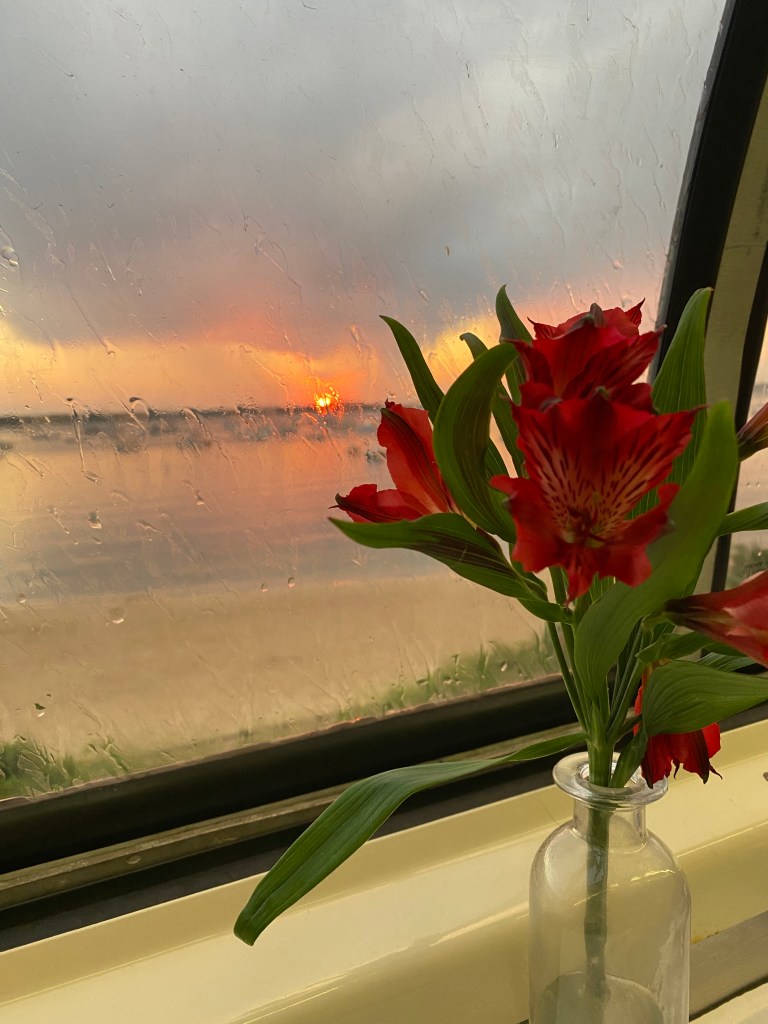
The price of the meal is included in the cost of your ticket. You choose among three classes of dinner service: First Class, Premium (the dome top) and Platinum (a club car). We went with Platinum so that we could experience the dome top. Even though it rained briefly during our trip, it still was a beautiful ride. If anything, the rain made the scenery look like an impressionistic painting.
Wine and cocktails can be purchased, so why not? How could I pass up an opportunity to get my dad a little tipsy? We bought a bottle, and I was driving, so you can guess who slurped up most of that bottle.
You can choose to depart from Falmouth, Hyannis or Buzzards Bay. The choice of day will determine which will be your departure station (or vice versa–your departure station determines the day of the week you’ll be riding.)
We were seated far enough apart, and the air conditioning was blasting away, so we felt comfortable and safe sharing this indoor space during COVID. (Plus we were both vaccinated).
More information is available on their website: Capetrain.com See the canal from a different vantage point. You’ll be glad you did!
We were originally scheduled to fly to Morocco on March 30, 2020. Well, we all know how THAT went. As late as March 3, 2020, we pondered canceling our trip, still uncertain as to whether or not it was safe to travel. Fortunately, the decision was made for us, so we were spared the anxiety and turmoil that other travelers experienced when they had to cut their trips short before everything closed completely down.
We had planned to take three other trips in 2020, our most ambitious travel schedule ever. So much for well laid plans. Like all the other travel enthusiasts out there, we discovered that 2020 would be the year that our big travel plans centered around obtaining groceries.
Fortunately, all our trips were with OAT and the company made rebooking painless, with generous travel credits. In fact, our rebooked trip is even better than the original, because we are including the pre-trip to Chefchaouen, an option that was not offered for our 2020 departure. Our fingers are crossed that in about three months, we will be doing an instant replay: packing and getting geared up for our trip.
So what do you do when you have about a year and a half interlude? If you’re me, you read a whole lot. The photo atop this post shows just some of the books I’ve read in preparation for our trip. These were all purchased from Thrift Books, an on line store that has an abundance of affordable second hand travel books in great shape.
If you are only going to read one book, I highly recommend “Dreams of Trespass” by Fatima Mernissi. Written in 1994, when she was 54 years old, Mernissi takes us back to her childhood and introduces us to two very different harems: the Fez home of her paternal grandparents and the country farm of her maternal grandparents. What I loved most about the book is it is written in the voice of a 9 year old girl. She asks “what makes a harem”? Do you need to have multiple wives (“farm” grandfather had 9) or can you have only 1 wife (like her father and uncle) and still be a harem? Does the harem have to have high walls (like in the city of Fez) or can it be wall-less like in the country? Ultimately, she concluded that unless you are a sultan, a harem was simply the home for an extended family; it offered a refuge for divorced and widowed women.
When Mernissi was a child, Morocco was a French “protectorate”. Remember that famous scene from the movie, Casablanca, where the Germans are out-sung by the French, who stand up and belt out La Marseillaise? Were there any Moroccans in that scene? If you are wondering what life was like for those conquered by the European “Christians”, Mernissi gives us this glimpse: “Christians, just like Muslims, fight each other all the time, and the Spanish and the French almost killed one another when they crossed our frontier. Then, when neither was able to exterminate the other, they decided to cut Morocco in half. They put soldiers near Arbaoua and said that from now on, to go north, you needed a pass because you are crossing into Spanish Morocco. To go south, you needed another pass because you are crossing into French Morocco.” I wonder what song the Moroccans would have sung had THEY been in Rick’s cafe?
Mernisi learned about World War II by listening to her male relatives who “talked about the Allemane, or Germans, a new breed of Christians who were giving a beating to the French and British, and they talked about a bomb that the Americans across the sea had dropped on Japan, which was one of the Asian nations near China, thousands of kilometers east of Mecca. The news about that bomb plunged father, Uncle Ali and my young cousins into deep despair, for if the Christians had thrown that bomb on the Asians who lived so far away, it was only a matter of time before they attacked the Arabs”
That’s the beauty of travel. It allows you to connect with people who, on the surface, seem so very different only to learn how much of our hopes, fears and desires are shared.
There are four ways your Tesla can be serviced: The usual ways, by bringing your car to their service center, or through a road call, but you can ALSO get your car serviced over the phone, via wifi, and with a “house call”. During my first 10 months of ownership, I’ve experienced three out of the four.
My first experience with Tesla’s service was a house call to install my garage door opener, ‘Home Link’. I made the appointment using the Tesla app on my phone, got instructions to ensure that the service rep would not be exposed to any Covid danger, and received confirmation of the date and time. Easy and efficient.
One of the many nice things about Teslas is there is so much routine maintenance you will never need, like periodic ‘lube, oil, filter’, tune ups, brake jobs (I rarely use my brakes). The maintenance schedule tells you to check your tires, your fluid levels and your wiper blades. That’s it. And you don’t even have to do that, because your car will TELL you if something is amiss…which it did several weeks ago, with an alert on my screen that the front passenger airbag needed attention, leading me to my second experience, service via phone and wifi.
Although the service rep certainly gave it her all, we ultimately concluded that I needed to bring the car in. Still, our time together wasn’t a waste because I learned that you “reboot” by simultaneously pressing both scroll buttons on the steering wheel, a handy thing to know. (Yes, I also could have read the manual, but what fun is that?)
After the technician determined it was safe to drive, I headed for one of the two Tesla Service Centers in New Jersey, my third experience. Lucky for me, it is a mere 17 miles away.
The loaner I was given was another Model 3. If they had been smart, they would have given me an S, so I could notice all the cool things THAT model had that my 3 didn’t. Instead I got a “standard” 3, which made me congratulate myself on the wisdom of my choice. One difference that I noticed immediately were the shiny metal pedals. I figured those were what you got when you bought the cheaper “standard” model. Nope. I subsequently learned were PERFORMANCE pedals, available for $150 from the Tesla Store. As I mentioned earlier, I RARELY need to use the brake, and I only use the accelerator when I’m not in self driving mode, so I can’t comprehend why ANYONE would pay more for shiny pedals. Does it make the car go faster? Does your foot grip the pedal better? Maybe it’s a guy thing? Speaking of “guy things”, I discovered the car was set to “chill” mode, which prevented me from driving like a 17 year old, experiencing the power and grandeur of a Tesla for the first time. (Okay, that was definitely sexist. There are certainly female speed demons out there.)
It turns out that the problem was with the front passenger seat, which had to be replaced, so a new seat had to be ordered and delivered. The Tesla App on my phone kept me updated on the expected completion date. How wonderful not to be subjected to the annoying prompts on an Interactive Voice Response System: “Press 1 if you want to buy a new car, press 2 if you are considering killing yourself so you don’t have to listen to this annoying music while you wait for what feels like hours…” Another easy, positive experience.
I can’t report back on the fourth experience, road service, because so far I haven’t needed it. I’m thinking that a flat tire might be likely reason for summoning help. Teslas do not come equipped with a spare tire in the trunk, although you could probably buy one if you so desired. I definitely don’t desire, because I haven’t ever changed a tire in my life, and I have no intention of starting now. But for those who have the “do it yourself” itch, there is also something that you can buy from the Tesla store (which will be discussed in a future post). If I DO use road service, you can count on me to report back.
Bottom line, as I approach my first year of ownership (March 5th is our anniversary), I have to give high marks to Tesla for service, especially because of the need to access it infrequently.
I sometimes find myself pondering life’s great mysteries (covid has had that effect on me). While gazing at the object in my garage, I ask myself, “do I own a car with a computer or do I really own a computer with a car?” (Take THAT, Socrates!)
Think about it. How many cars get periodic software updates over wifi? Not being a “car person”, I don’t know the answer, but my suspicion is, so far, there’s only one.
So, how does that happen? Your Tesla is sitting in your garage, minding its own business, when suddenly you get a notification. The Tesla App on your phone asks you whether you would like to install the latest software. It tells you how long the installation will take (usually about 30 minutes) and reminds you that you can’t drive while the update is downloading. But what it DOESN’T do is give you even the slightest clue as to what the update entails.
If you are someone who wants everything to stay in the same place and values consistency over possible improvements, then you might find the update feature to be a bit disconcerting. As for me, I always succumb to my “devil may care” side and bang that update button.
Voila, the next time, I get in the car, something (or things) has changed. To find out exactly WHAT, I have to consult the touchscreen in my car. At that point, I start to feel like I am trying to solve one of those kiddie puzzles that shows two photos side by side, challenging me to discover what is different. Except I didn’t have the side by side images. Instead, I got to consult “release notes”.
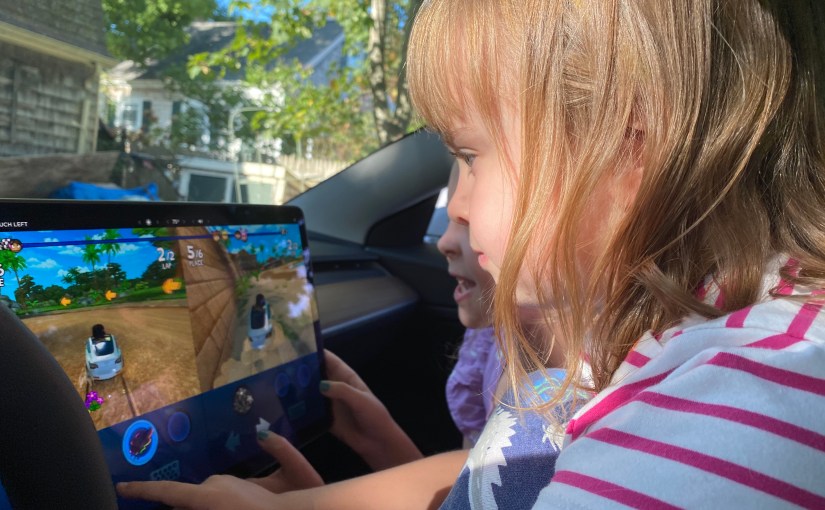
For this latest update, the first improvement was obvious: You could now look at the list of changes in the sidebar and easily navigate to the ones that are of interest to YOU. Don’t ask what those three bars on the right mean. I have no clue. In case there was ANY doubt in your mind as to who is Tesla’s target market, the order of the improvements should make it VERY clear. I mean, I love my Tesla and all, but to sit in it and play games? The only time THAT happens is when I have certain young ladies with me.
I was also momentarily puzzled by the “emission testing mode improvements”, (Wait, an electric car has emissions?!) then I remembered the fart feature. Yes, there was even room for improvement with that essential capability.
For ME the most important update was the 6th one listed, “Driving Visualization Improvements”. Okay, tell me more…
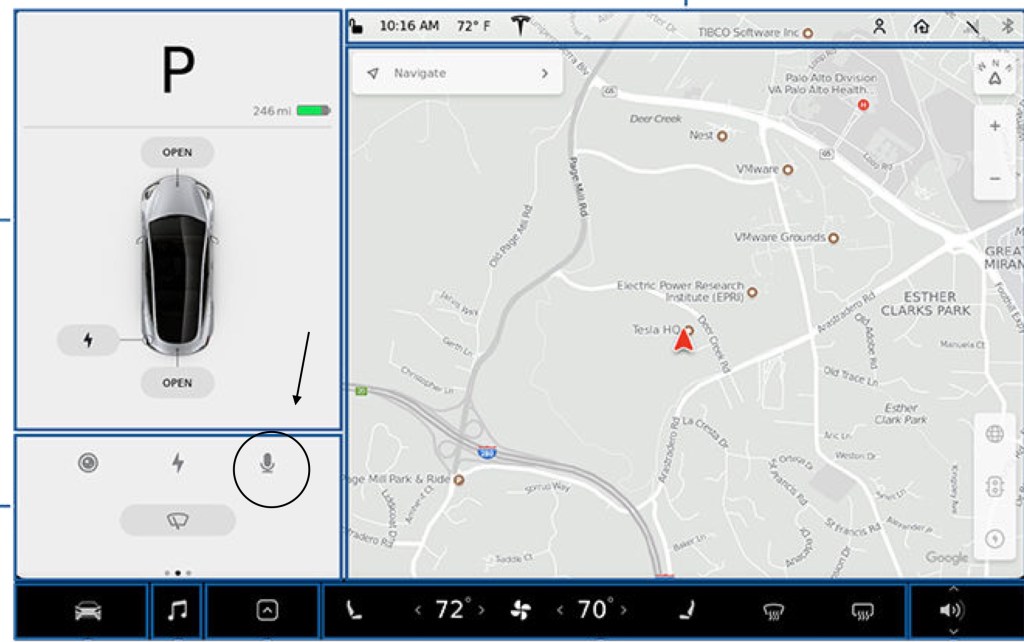
Want to see how the touch screens differ? Clicking on the little x in the release note corner would reveal the “navigate” screen with the map area slightly reduced, but the big differences are on the left side of the screen.
You know the line in that old Joni Mitchell song “you don’t know what you’ve got till it’s gone”? Well, that applies here. I didn’t realize the icon for voice commands (a little microphone) was missing until I tried to use it to call my husband. Check it out–NO mention of voice commands was made in the release notes.
Well, thanks to Covid, my days aren’t what you would call “full”, and I’m not driving much, so I had plenty of time to sit in my garage and scroll through the screens in search of my little microphone. No luck. I also checked the internet to see if the online manual had been updated. Nope. Finally, I posted an inquiry in the Tesla Motor Club Forum asking how one can access voice commands after the update. Finally! A couple of posters were kind enough to tell me that pressing the right scroll button on the steering wheel activates voice commands. This isn’t the first time that the Tesla Motor Club has been the most effective route to getting my questions answered, so Tesla owners, keep that resource in mind the next time you need help.
Let me repeat: I LOOOVE my Tesla, but for crying out loud, why oh why is it so bloody difficult to learn what’s in an update? Why can’t the release notes be accessed through the Tesla App on your phone? And why are the explanations so brief? Jeez guys, I love engineers so much that I actually gave birth to my very own, but, come on, get someone with an English degree to help you explain this stuff!
I’ve also discovered that there are enhancements that aren’t even mentioned in the release notes. For example, prior to the update, while allowing the car to self drive, I would get frequent reminders to move the steering wheel a little. I understand that the intent was to ensure that the driver paid attention to the road by occasionally touching the wheel. Doing so lets my car know I am awake and would be in control, if necessary. But I’ve been driving for far too many years, so keeping at least one hand on the wheel is a habit that I don’t intend to break. It just feels comfortable. Nevertheless, even with BOTH hands on the wheel, I was urged to jiggle it with annoying frequency, and if I jiggled too vigorously, self drive turned off. If I DIDN’T jiggle, the screen lit up with a blue flashing light. When I had my car serviced (I’ll tell you all about it in a future post), I requested that the sensitivity of the steering mechanism checked, thinking that it didn’t pick up the pressure from my hands. Nope, it didn’t work that way, I was informed. The car was checking the “torque”.
Well, despite doing nothing different after the update, I was thrilled to see that I now rarely get the “jiggle” reminder. Now THAT’S a very welcome change.
I’ll admit it. I was reluctant to buy a Tesla because I was worried about running out of “juice”. What if I was on a long trip and I couldn’t find a charging station? Gas stations are everywhere, but what about charging stations? Fortunately, my friend Laura showed me that my fears were baseless.
Sitting together in her Tesla S, she asked me to specify a destination, typed it into the “Navigate” box, and voila! The car mapped the route (in my example here, we are going from Central Jersey to Columbus, Ohio), showing recommended charging stops, estimated arrival times, and length of time it would take to charge to the recommended level. (Never charge to 100%, but we’ll get into that later). If you click on one of the route’s pins, up will pop information about that particular supercharger–how many stalls and which amenities are available.
The car’s Navigation system usually recommends Tesla Superchargers along the route, and so far, I have been unable to find a destination for which there are not sufficient Superchargers, but who knows? Maybe it is possible. And what if you want to plan out a long trip, but don’t want to do it while sitting in your car? Fear not, there are options.
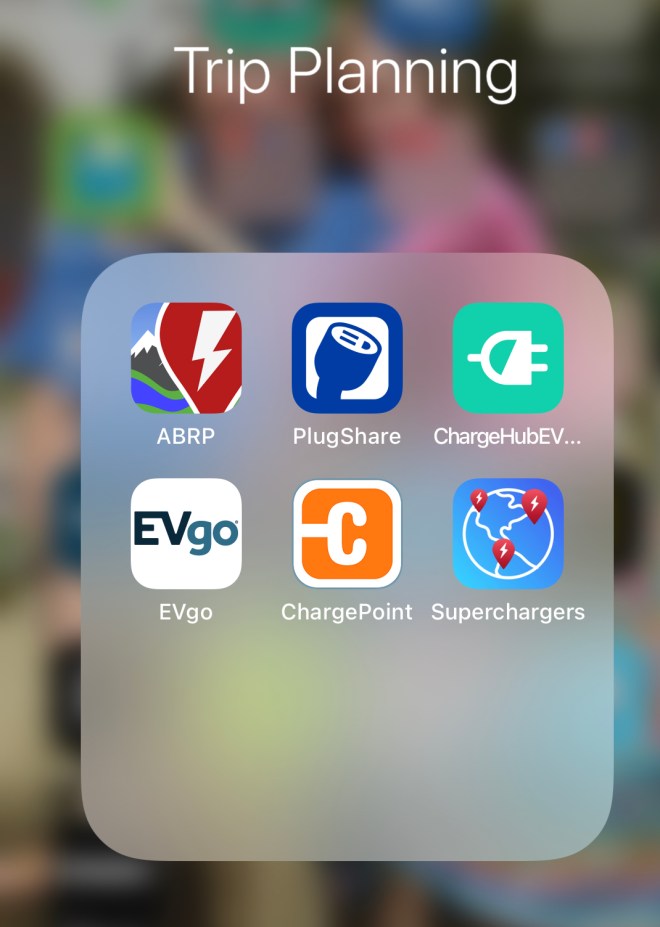
Like the Tesla Navigation app in your car, the top three apps map out your route, providing recommended stops for charging, with information about the amenities offered per stop.
If you prefer using your computer rather than your phone, here ya go:
There are more–but these 6 apps should get you started and keep you busy for quite a while. The bottom three icons are for different charging networks. Evgo and Chargepoint charging stations are open to everyone. You just need the correct connector. For the Supercharger network you need the correct car. If it isn’t a Teslas, you’re out of luck.
The last time I visited my family in Massachusetts, I only knew about the EVgo network, so I was pleased to see that there were 2 EvGo chargers closer than the nearest Tesla Supercharger. Boy, did I have a lot to learn. Lesson #1: make sure you have a compatible adaptor. Doesn’t sound difficult, does it? But wait: the options are CHAdeMO, CCS, J1772 and NEMA. Although your Tesla comes with this neat bag stashed in the trunk, it only contains the J1772 and NEMA adaptors. Guess what the EvGo network uses? If you chose “none of the above”, you’d be right.
The J1772 adaptor is on the right. On the left, you see what awaited me at the EvGo station. Sadly, it was impossible to “mate” these two, although, believe me, I tried.
Subsequently, I learned that the gadget on the left is know as a CCS connector, which unfortunately, isn’t available for Teslas yet. A bit of a bummer, given that CCS is becoming the USA standard. Tesla DOES offer an adaptor for use with CHAdeMO connectors, but it is bulky and costs $450. Because CHAdeMo is not the standard of the future, I’m hard pressed to plunk down that kind of money, especially since enough Superchargers are available, although sometimes I have to drive 5 or 10 minutes out of my way. On the bright side, Superchargers are located near food, bathrooms, shopping, wifi, AND the other Tesla owners I’ve met while charging are all so friendly and helpful.
Lesson #2: Research the different charging networks. After I discovered PlugShare and ChargePoint, I learned that there were several OTHER charging stations nearby that offered FREE level 1 charging, compatible with the J1772 adaptor.
Lesson #3: Learn about the different charging levels. Level 1 is the power you get when you plug into a standard home outlet, using a NEMA adaptor. This gives you a charge of 110 volts, which gets you about 8 to 15 miles worth of charge per hour. Level 2 is 240 volts, which gets you approximately 124 miles in about 5 hours. The only way to charge faster is with DC, and that is what the superchargers use. (You need the CCS or CHAdeMO adaptor to access a non-Tesla DC supercharger).
I learned from my electrical engineer son that 240 volts is the maximum you can get for home charging, and let me tell you, it takes a WHOLE lot longer to charge at home than it does with supercharging, but who cares? At home, you can charge while you’re sleeping. At least that’s what I normally do.
I know you probably have heard more about charging than you want or need, but one last thing: Your Tesla will go from 20% to 50% a whole lot faster than from 50% to 80%. Keep that in mind if you are using a network where you pay by the MINUTE, not by the kWh or mile (that’s how EvGo does it).
Here’s a visual example. I decided to start 2021 with the battery fully charged. The computer estimated it would take six hours and thirty minutes to go from 29% to 100%. When I checked the progress on my iPhone this is what I discovered.
After four and a half hours, the battery was at 98%, and it was estimated it would take almost another hour for the last 2%. That explains why the Tesla trip planner suggests that you run the battery to low levels before stopping to charge, and it never recommends that you charge to the maximum. I found that puzzling, until my son explained that it was like Lucy and Ethyl at the chocolate factory. Initially they could stuff a lot of chocolates into their mouths, but as their mouths got full, the “stuffing” got slower. Or if you prefer, think about filling a container with water and how you slow down as the container gets full. You’ll see the trip planner shown at the top of this post has you run your battery WAY down before charging, plus it doesn’t have you charge too much, so you minimize your time at charging stations. Of course, when I go on long distance drives, I look forward to bathroom, food and stretching breaks, so I sometimes stay longer than suggested at the charging stops–but that’s just a personal preference.
As you’ve probably guessed from this post, I am NOT technically oriented. If you are, and would like more in-depth discussions, check out the Tesla Motors Club (https://teslamotorsclub.com) forums.
I hope this information is helpful. Any tips anyone wants to share would be most welcome. Let’s all learn together!
Happy 2021 everyone. One of my resolutions is to write several Tesla posts relating “the good, the bad and the ugly” aspects of ownership. So, here goes. Let’s see how long THIS resolution lasts!
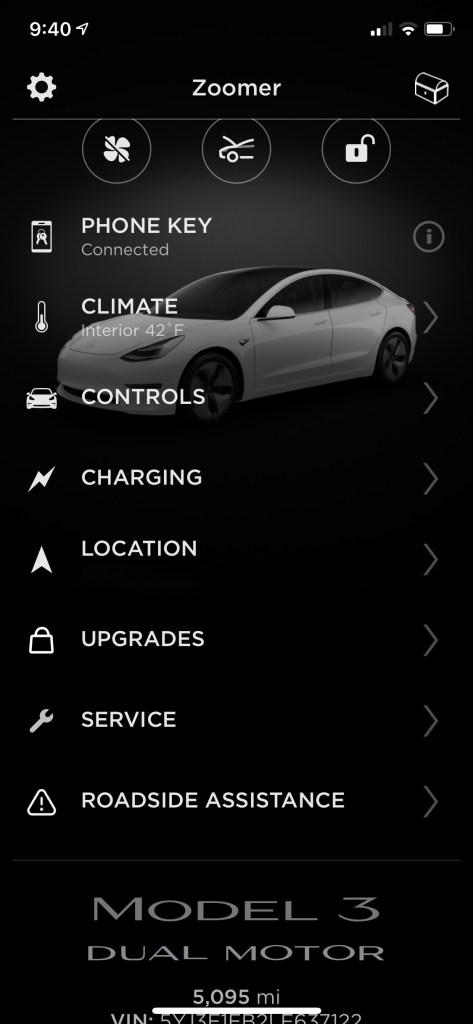
After you buy a Tesla, you simultaneously enter into a very intense relationship with your smartphone. Pre-purchase, I usually had a vague idea where my iPhone might be. Now, it is rarely out of my sight. Why? Because my iPhone is also my car key and the way to access all of the wonderful functions on the Tesla app. Check it out.
Yes, many cars allow you to remotely turn on your heat and air-conditioning. but can you also choose your desired temperature? Does it allow you to turn on the seat warmers? It only takes a swipe of “climate” to do both. Of course, you have to REMEMBER that function exists, which for me, is somewhat of a challenge.
“Controls” allows you to flash your lights, blow the horn, remotely start the car, lock and unlock the doors, open the front and rear trunks, activate “sentry mode” (which turns on cameras so any activity around your car is captured on video). If by any chance you allow someone else to drive your car, you can limit the maximum speed limit and if you choose “valet mode“, you also prevent access to the glove box.
“Charging” seems self explanatory, but it will be the subject of a future chronicle. (Bet you can’t wait)
“Location” made me comfortable choosing a white car. My last three vehicles have all been red, because that is, by far, the very BEST color for finding a car in parking lots. (I have trouble localizing sound, so the noise button on many cars doesn’t help me much). Sadly, red Teslas cost $2,000 more, so I opted for the only color that didn’t increase the price. Because location shows you exactly where your car is at any time, that feature (and the inability to hot wire it) makes theft of your Tesla a bit challenging.
Those of us who didn’t pay extra for Full Self Driving (FSD), at time of purchase can change our mind at any time by swiping “Upgrades” and forking over an additional $10,000. FSD allows you to input your destination to let navigation take over. You literally can leave the driving to the car because FSD allows it to change lanes, exit highways, stop at traffic lights and stop signs- whatever is necessary to get you to where you want to go. It will even park itself upon arrival at your destination.
Let’s say when you arrive, the sun is shining but the weather takes a turn for the worse, and now the rain is coming down hard. No worries. With FSD, you can SUMMON the car to drive itself to pick you up. It might be worth $10,000 to see the expression on others’ faces as they watch the driverless car come rolling your way. Not to me, but I’ll bet there are others for whom it would be worth the $$$. As for me, I’m quite fine with the “less than full” self driving capabilities I currently have. If you think that might be the topic for another post, you could be right.
Another current upgrade: An acceleration boost. Instead of taking a whole 4.2 seconds to go from 0 to 60, for a mere $2,000, you can cut the time to 3.7 seconds. Who would care about half a second difference? Who would even notice? Certainly not members of MY demographic. I’m convinced, however, that there IS a particular demographic Tesla designers/engineers keep in mind. Hint: my son is definitely a member of their target market.
We still aren’t done with all of the app’s features. You can schedule “Service“, (another future topic) or call for “Road side assistance” (fortunately, so far I have no experience with THAT feature).
At the very bottom of the app is the odometer, the VIN and the software version. Yeah, here comes the BAD part. You can’t seesaw many miles you’ve driven unless you look at the app, or go through a screen or two on the “iPad looking thingie” in the car. Maybe it’s just me, but I LIKE being able to easily check how many miles I’ve gone.
Now let’s move to the TOP of the app. Tapping the gear box at the top left brings you to “Settings“, where you get emails and notifications about software updates (another future topic) from Tesla, access video guides, and synch your calendar.
The little arrow at the top performs the same function as location.
Finally, in the upper right hand corner are the wi-fi, internet and battery indicators, plus the “loot box”. The loot box is where your free supercharger miles show up whenever someone uses your referral link. If someone uses a referral link when they buy their Tesla, they also get 1,000 miles of free charging at a SuperCharger. If you happen to be in the market for a Tesla and don’t have a friend with a referral code, I’d be delighted to share mine.
So there is a whole lot of GOOD going on, but I promised Bad and Ugly so I’ll end with that: The BAD (and Ugly) is the supercharger miles expire. If you do most of your charging at home, which I do, then the only time you would use a supercharger is on a long trip. During Covid, there haven’t been many of those!
At last. I can finally check “have mug shot taken” off my bucket list. So how did I happen to get in front of a police camera, holding a white board in front of my chest, with my name and date printed on it? And was I able to smile?
I’ll answer the second question first: Yes, I did indeed smile. So, those of you who are mug shot experts will know from THAT answer that I didn’t get there by robbing a bank, committing arson or assaulting a president. Because, as the officer/photographer explained to me, criminals aren’t allowed to smile.
And no, I wasn’t picked up for protesting (peacefully or otherwise). Instead, I was there being fingerprinted and photographed because I offered to help out with the upcoming election’s mail in vote. You see, I figured the very nice people working in the Board of Elections Office are going to be bombarded this November. Not only that, but they are going to be subjected to all kinds of criticism, and speculation of misdeeds that will appear on Facebook as ‘fact”, most likely posted by people who wouldn’t know a fact if it bit them on the ass.
Caring deeply about our country, and recognizing how important voting is to our democracy, I figured it would be patriotic to help out.
In our area, at least, you have to be highly motivated to volunteer because after you fill out two forms, you have to make an appointment for 7:30 PM at the county sheriff’s department to get your glamour shot and fingerprints done. Of course, when I arrived at what I THOUGHT was the sheriff’s office, the building was locked up, and there was no one in sight. But I am resourceful–I saw the next building had lights on, so I pressed the button to be admitted. Once inside, I saw a young male counting out a huge wad of money, which I found to be interesting and slightly unusual, but eventually figured out it he was probably bailing someone out. Yep, I was standing in the entry to the county jail. After further instructions and a phone call, I returned to the main building and eventually was let in to be “processed” by the very friendly and helpful officer.
The best part? They no longer smear all that black gunk over your fingers to take your prints. (I hated that) But that’s not all. I also learned that because I am not (so far) a criminal, a teacher, an officer of the law, or a politician, my finger prints are not kept on file in some database. Once a background check is completed, your digits are deleted. (I know, you’re probably thinking “what an educational and enlightening this post turned out to be”. You’re welcome.)
Next step was completing the background check, which I imagined in addition to being bone jarringly boring — I was FAR more intriguing during my college days — included a glance at my voting record. I had been asked whether I was able to be non-partisan, and although I CLEARLY have strong opinions about the current administration, that is probably true of 95% of the American population. (The other 5% is most likely in a coma.) Still, I can put my feelings aside to do a job professionally and ethically. Out of curiosity, however, I looked on line at my voting record and was surprised to see that I had registered as a Republican three times, as a Democrat four times and as an independent TWENTY EIGHT times for the last thirty five elections I’ve voted in.
So, after all that, what has my volunteer work entailed? So far I have completed two days on the job. The first day I spent detaching the signature “flap” from the sealed envelope containing the ballot. This protects the confidentiality of the vote. The next day, I took ballots (from a different city) out of envelopes and inspected them to make sure they could be processed by machine. If not, then I put them aside to be hand counted and I completed a tally sheet to ensure that all ballots (and envelopes) are accounted for. The ballots are kept by voting district to be machine counted, and the flaps and envelopes are retained, in case there are any questions down the road.
I’m glad that New Jersey is able to start the process 10 days before Election Day, because there is a lot of work involved. I was impressed by the multiple checks and counts to ensure that all ballots are protected. People are working hard to make this election a successful and fair process. Plus, I’m gaining additional respect for those who do repetitive, manual labor. Let me tell you, it takes its toll–at least it has on me!
I’ve already confessed in prior posts that I am not a “car person”. I’m not an engineer, or scientist or mathematician either. So, my observations about my first long distance drive will seem really basic to those who ARE any of the things that I am not. If any of the aforementioned happen to stumble upon this blog, PLEASE feel free to comment. I would be enormously grateful for your insights, corrections and helpful hints.
The Driving Experience From my 1,450 miles of driving during my 5 months of ownership, I already knew my Tesla was pretty damn amazing, well before I set off on my first long distance journey. What I DIDN’T know was how incredibly relaxing a trip can be even when you’re the driver. Want to take your hands off the wheel to get a cold drink, or rummage through your cooler? No problem. Self drive has it under control. Are you usually tense when you are in stop and go traffic? That’s a thing of the past, because the car stops and goes with traffic, allowing you, the driver to enjoy your surroundings, eat, change up your music – whatever you want.
When I missed the turn off for the Tappan Zee (now Mario Cuomo Bridge, but old habits are hard to shake) I was forced to drive over the GW Bridge. What would normally be harrowing was just a long and least favorite experience. I didn’t have to worry about being hemmed in on all sides by trucks. The Tesla kept me safely in the middle of my lane.
About being in the middle of the lane, I have learned I normally drive much closer to the right side of the road, so as I was learning the ins and outs of self drive, I freaked out when the Tesla pulled me to the left. I was afraid it wasn’t going to self correct in time. I’m glad that I practiced using the self driving feature on the winding, hilly country roads in my area so I could gain confidence in its safety.
Trip Planning When I used the Tesla trip planning app, it assumed that I would be starting on the trip at the current charge level. I had never charged to 100% before (the physicists know why, but WE don’t need to get into the technical details here) so the app led me to believe that I wouldn’t be able to make the 260 mile trip without stopping to recharge. Wrong. If I chose to do so, I discovered I could have easily made it the entire way, with at least 20% battery to spare.
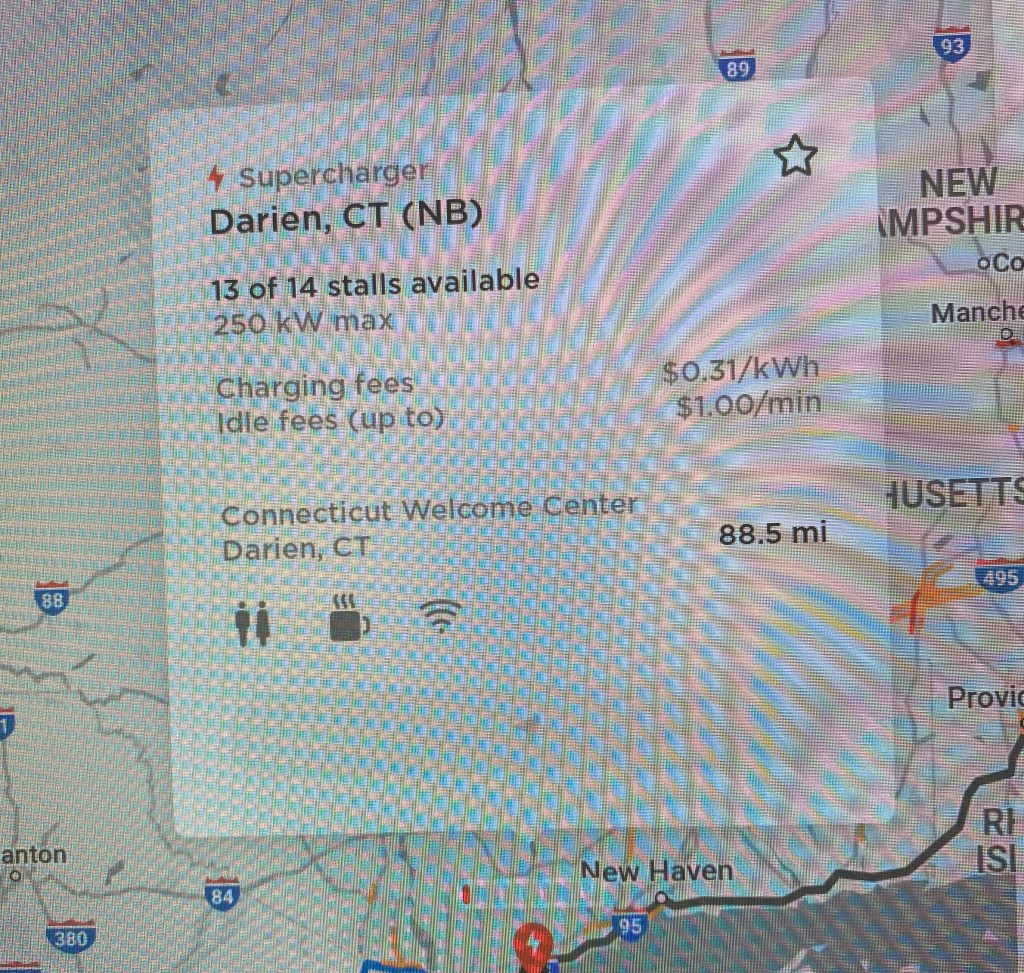
The Tesla navigation app recommends charging stops along your route. Take a look at the information the app provides for each charging station:
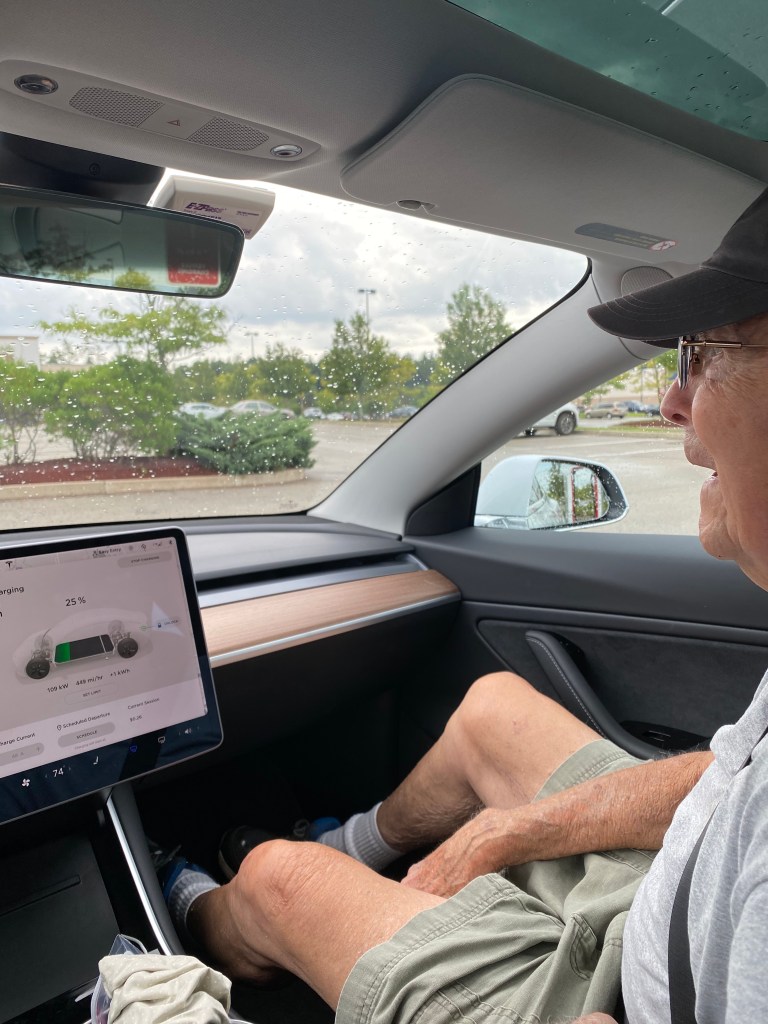
The app is designed to minimize charging times, so for the return, the trip planner suggested just one stop of 15 minutes. (I started my return with less than a full charge). Here’s the thing. If you let the car sit after charging is completed, you get a 5 minute grace period. If you linger longer, as shown in the photo, you are charged $1 a minute idling fees. That’s one way to make sure that the charging stations are available to everyone who needs them. But, if you plan on stopping to have lunch and a bathroom break, you may WANT a longer charge time.
Sad to say, I discovered the battery has a much longer range than my kidneys. MY need to stop occurred WAY before I needed to charge. Here’s another thing: for a reason that is obvious to the physicists and engineers, (but a mystery to me) a battery charges faster when it is closer to empty than when it is closer to full, so that’s something else to factor when planning your stops. So many things to consider. I’m proud to reveal that I did somewhat better on the return trip mastering the car/body connection. One unanticipated snag was the charging station in Madison was “temporarily out of service”, disrupting my plan to charge while visiting with a friend. Fortunately, I knew that BEFORE I headed back, so was able to reconfigure my stops. All these “discoveries” will make my next trip stops so much easier to plan.
The “other’ charging stations None of my family members have an outdoor outlet, so I couldn’t charge overnight using a regular household current. The closest chargers were two EvGo stations offering both slow and fast chargers. I had planned to use the fast CHAdeMO option but instead I experienced rude awakening #1: the adapter that came with the car didn’t fit. I would have needed to purchase the correct adapter for $450 from the Tesla store. I also discovered that the charging speed of even the FAST (CHAdeMO) connection was significantly less than what I would experience at a supercharger. (DEFINITELY not worth spending $450!) Next came rude awakening #2: I couldn’t get the included J1172 adapter to fit on the nozzle of the slower option. I was afraid of damaging one (or both) so I gave up and decided this would be something I would try once I got home (and had my trusty husband by my side). Luckily, there WAS a Tesla Supercharger about 15 minutes away, so that’s the one I used. The whole point of this stream of consciousness rambling is that home charging is essential for electric vehicle owners AND you need to give some thought to charging stops BEFORE you head off. It isn’t QUITE as easy and convenient as stopping for gas. At least not yet. So, no cross country trips in the Tesla will be in our near future. I’d rather plan our stops around where we want to be, rather than where we have to charge.
Supercharger options
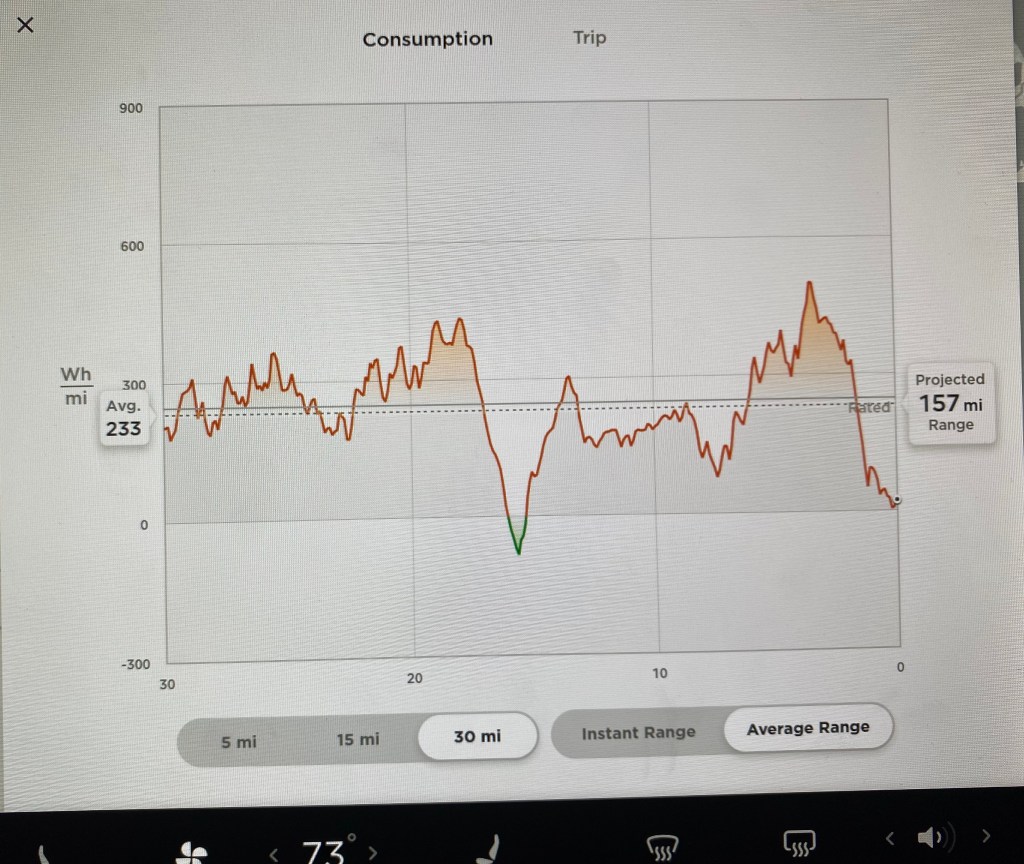
Energy Consumption The discoveries keep coming. Here’s another. When you let the car drive itself, energy consumption improves. At least it did for me. Here’s how I could tell. The energy app shows average consumption over three different ranges. 300 watt hours per mile is the expected average, but the thick solid line in the graph below shows the expected average when the terrain (and possibly external temperature?) is taken into consideration. The dotted line shows my actual results for the past 30 miles. If it is below the solid line, I’m doing better than expected. (This is one example where being “above average” ISN’T a good thing). Notice the little green triangle? That’s when the battery was recharging itself. If I continued to drive the way I had for the past 30 miles, I would have sufficient energy to go another 157 miles. What’s puzzling is when you add the averages (actual and projected) you come up with 390 miles, which is far greater than the EPA range of 322. This, by the way, was not my graph from the actual trip. Self driving widened the gap between the solid and dotted lines in a very positive way.
Everything Else My 6 and 7 year old grand nieces proclaimed me their “coolest aunt” strictly on the basis of my car ownership. The ability of the car to fart upon command was definitely a huge hit, as was its ability to go from 0 to 60 in 4 seconds. They dubbed the fast acceleration “the rocket” and requested that I do “the rocket” again and again.
One final observation. Having self drive and navigation, however does NOT eliminate the “back seat” driver, even when he (and so far it has ALWAYS been a “he”) sits in front.
Love ya, dad, but one driver per car is sufficient














 Destination NOW